Using UniaxialExtension
[1]:
import pymecht as pmt
import numpy as np
from matplotlib import pyplot as plt
The pymecht.UniaxialExtension module simulates a specimen made up of any material under uniaxial extension conditino. It can calculate deformation given a force, or force given a deformation.
[2]:
pmt.UniaxialExtension?
Init signature:
pmt.UniaxialExtension(
    mat_model,
    disp_measure='stretch',
    force_measure='cauchy',
)
Docstring:
For simulating uniaxial extension of a sample

+-----------+-----------------------+
| Parameter | Description (default) |
+===========+=======================+
| L0        | Length of sample (1)  |
+-----------+-----------------------+
| A0        | Cross-section area (1)|
+-----------+-----------------------+

Parameters
----------
mat_model: MatModel
    A material model object of type MatModel

disp_measure: str
    The measure of displacement with the following options:

    * 'stretch' : The stretch ratio (default)
    * 'strain' : The Green-Lagrange strain
    * 'deltal' : The change in length
    * 'length' : The length

force_measure: str
    The measure of force with the following options:

    * 'force' : The force per unit area
    * 'cauchy' : The Cauchy stress (default)
    * '1pk' or '1stpk' or 'firstpk' : The first Piola-Kirchhoff stress
    * '2pk' or '2ndpk' or 'secondpk' : The second Piola-Kirchhoff stress

File:           /usr/local/lib/python3.9/site-packages/pymecht/SampleExperiment.py
Type:           type
Subclasses:
For details about the material options, please refer to the MatModel module. The default settings for displacement and force are stretch and cauchy stress respectively. For details about the description of different options in displacement or force, please refer to the pymecht.SampleExperiment.UniaxialExtension.
Displacement controlled
Firstly, we begin by calculating the force given a deformation. The pymecht.UniaxialExtension module offers four displacement measurement options: stretch, strain, length, and deltal. The default setting is disp_measure = 'stretch'. We can change the displacement measurement setting using the disp_measure option.
For calculating the force measure at a given deformation, we use pmt.UniaxialExtension.disp_controlled.
pmt.UniaxialExtension.disp_controlled(self, inp, params=None)
It has two inputs: inp and params. inp represents the given deformation data, params represents the parameter values of sample. The process is shown below.
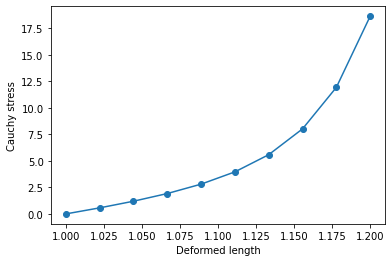
In this example, the material properties are defined as a combination of the Neo-Hookean model and the Gasser-Ogden-Holzapfel model. The displacement measurement option is set to disp_measure = 'length', and the force measurement remains at the default force_measure = 'force'. For the uniaxial extension simulation, the fiber direction is set along the extension direction using pmt.specify_single_fiber. For more details about fiber direction, please read Setting fiber
directions.
[3]:
#define material
mat = pmt.MatModel('nh', 'goh')

#set sample and measurement option
sample = pmt.UniaxialExtension(mat, disp_measure = 'length')
pmt.specify_single_fiber(sample)

#set parameter values
sample_params = sample.parameters
sample_params.set('mu_0',5)
sample_params.set('A0',0.1)
sample_params.set('L0',1)
sample_params.set('k1_1',5)
sample_params.set('k2_1',15)
sample_params.set('k3_1',0.1)
print(sample)
print(sample_params)
Fiber directions set to  0  degrees ( 0.0  radians)
An object of type UniaxialExtensionwith length as input, cauchy as output, and the following material
Material model with 2 components:
Component1: NH with fiber direction(s):[array([1., 0., 0.])]
Component2: GOH with fiber direction(s):[array([1., 0., 0.])]

------------------------------------------------------------------
Keys              Value       Fixed?      Lower bound Upper bound
------------------------------------------------------------------
L0                1.00        No          1.00e-04    1.00e+03
A0                0.10        No          1.00e-04    1.00e+03
mu_0              5.00        No          1.00e-04    1.00e+02
k1_1              5.00        No          0.10        30.00
k2_1              15.00       No          0.10        30.00
k3_1              0.10        No          0.00        0.33
------------------------------------------------------------------
[4]:
#give applied displacement
deformed_length = np.linspace(1, 1.2, 10)

#calculating force
force = sample.disp_controlled(deformed_length,sample_params)

#post-processing
plt.plot(deformed_length,force,'-o')
plt.ylabel('Cauchy stress')
plt.xlabel('Deformed length')
plt.show()
Other types of deformation option ('stretch', 'strain' and 'deltal')
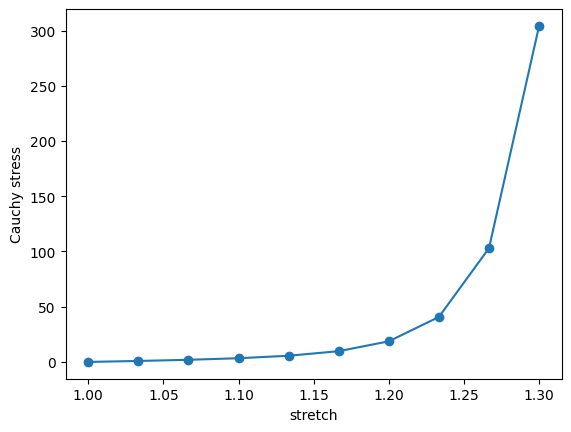
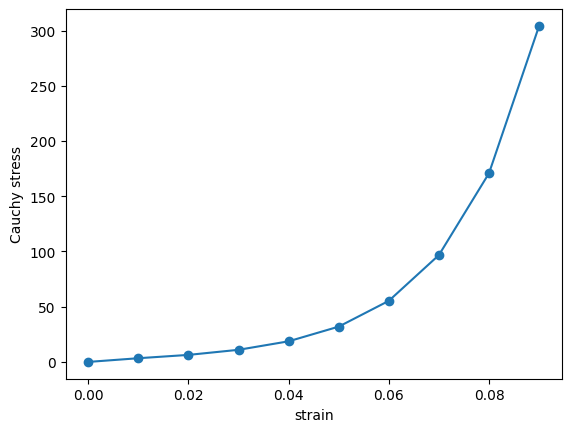
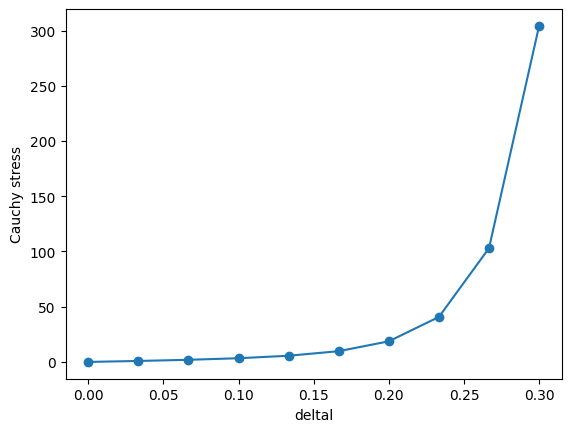
It also offers other displacement measurement options. Following the steps outlined above, examples of these alternative options are provided below. To simplify the code, the displacement values are generated and stored in label_disp, which is a dictionary. These values are then used in a loop. The force measurement remains at the default setting of cauchy stress.
[ ]:
label_disp = {'stretch': np.linspace(1,1.3,10), 'strain': np.linspace(0,0.09,10),'deltal': np.linspace(0, 0.3,10)} #the different types of disp measurements


for key, value in label_disp.items():

    #create the sample and measurement option
    sample = pmt.UniaxialExtension(mat, disp_measure = key )

    #given applied displacement
    applied_disp = value #applied displacement

    #calculating stress
    stress = sample.disp_controlled(applied_disp, sample_params)

    #post-processing
    plt.plot(applied_disp,stress,'-o')
    plt.ylabel('Cauchy stress')
    plt.xlabel(key)
    plt.show()
Force controlled
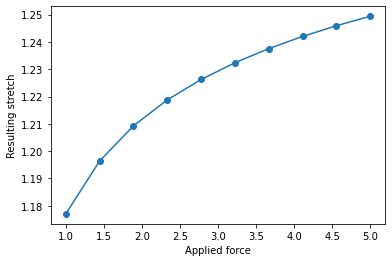
Similar to the displacement measurement options, the force measurement in pymechT also offers several alternatives. The available options for force measurement are: force, cauchy: Cauchy stress, 1pk: 1st PK stress, and 2pk: 2nd PK stress. We can change the force measurement setting using the force_measure option. The first example uses the force option, and the displacement measurment is stretch. The process is same as the steps as above.
For calculation of force given deformation, we use pmt.UniaxialExtension.force_controlled
pmt.UniaxialExtension.force_controlled(self, forces, params=None, x0=None)
It has three inputs: forces, params and x0. forces represents the given force data, params represents the parameter values of sample, x0 represents the initial guess for the displacement.
When using force_controlled simulation, an iterative solution is involved, for which an initial guess is required. There is a default value, which may not be reasonable for different disp_measures. Thus, we explicitly specify the initial guess using x0 argument.
[6]:
#define material
mat = pmt.MatModel('nh', 'goh')

#set sample
sample = pmt.UniaxialExtension(mat, force_measure='force')
pmt.specify_single_fiber(sample)

#set parameter value
sample_params = sample.parameters
sample_params.set('mu_0',5)
sample_params.set('A0',0.1)
sample_params.set('L0',10)
sample_params.set('k1_1',5)
sample_params.set('k2_1',15)
sample_params.set('k3_1',0.1)
print(sample)
print(sample_params)
Fiber directions set to  0  degrees ( 0.0  radians)
An object of type UniaxialExtensionwith stretch as input, force as output, and the following material
Material model with 2 components:
Component1: NH with fiber direction(s):[array([1., 0., 0.])]
Component2: GOH with fiber direction(s):[array([1., 0., 0.])]

------------------------------------------------------------------
Keys              Value       Fixed?      Lower bound Upper bound
------------------------------------------------------------------
L0                10.00       No          1.00e-04    1.00e+03
A0                0.10        No          1.00e-04    1.00e+03
mu_0              5.00        No          1.00e-04    1.00e+02
k1_1              5.00        No          0.10        30.00
k2_1              15.00       No          0.10        30.00
k3_1              0.10        No          0.00        0.33
------------------------------------------------------------------
[7]:
#apply force
applied_force = np.linspace(1,5,10)

#calculating deformation
deformation = sample.force_controlled(applied_force, sample_params, x0 = [0.1])

#post-processing
plt.plot(applied_force,deformation,'-o')
plt.ylabel('Resulting stretch')
plt.xlabel('Applied force')
plt.show()
Different force_measures
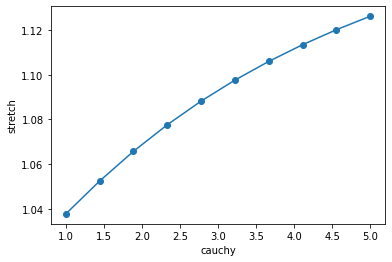
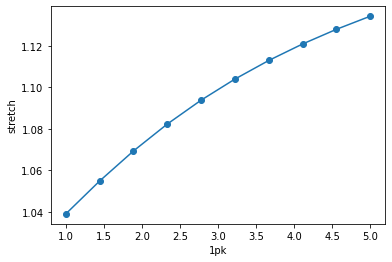
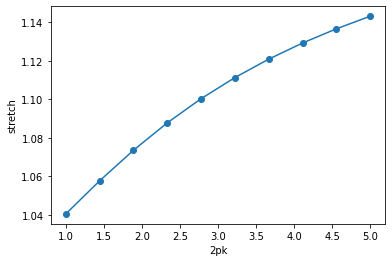
The other options for force_measure are demonstrated below.
[8]:
#define material
mat = pmt.MatModel('nh', 'goh')

label_force = {'cauchy': np.linspace(1,5,10), '1pk': np.linspace(1,5,10),'2pk': np.linspace(1,5,10)} #different types of force measurements used in for loop

for key, value in label_force.items():
    sample = pmt.UniaxialExtension(mat, force_measure = key )
    pmt.specify_single_fiber(sample)

    #force setting
    applied_force = value

    #calculating deformation (strech)
    disp = sample.force_controlled(applied_force, sample_params, x0 = [0.5])

    #post-process
    plt.plot(applied_force,disp,'-o')
    plt.ylabel('stretch')
    plt.xlabel(key)
    plt.show()
Fiber directions set to 0 degrees ( 0.0 radians)
Fiber directions set to 0 degrees ( 0.0 radians)
Fiber directions set to 0 degrees ( 0.0 radians)
Combining different 'disp_measure' and 'force_measure'
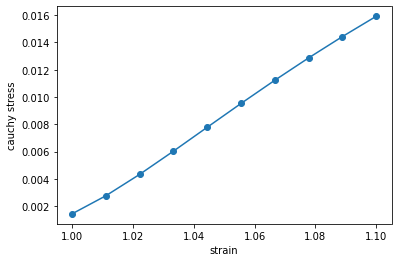
One can also freely combine different options for disp_measure and force_measure. For example, we used disp_measure = 'strain' and force_measure = 'cauchy'.
[9]:
#define material
mat = pmt.MatModel('nh', 'goh')

#set sample
sample = pmt.UniaxialExtension(mat, disp_measure = 'strain ', force_measure = 'cauchy' )
sample_params = sample.parameters
pmt.specify_single_fiber(sample)

#set parameter
sample_params.set('mu_0',5)
sample_params.set('A0',0.1)
sample_params.set('L0',10)
sample_params.set('k1_1',5)
sample_params.set('k2_1',15)
sample_params.set('k3_1',0.1)

#calculating displacement (force)
applied_strain = np.linspace(1,1.1,10)

#calculating force (displacement)
cauchy = sample.force_controlled(applied_force, sample_params, x0 = None)

#post-process
plt.plot(applied_strain,cauchy,'-o')
plt.ylabel('cauchy stress')
plt.xlabel('strain')
plt.show()
Fiber directions set to 0 degrees ( 0.0 radians)
Fiber direction warning
We use [1, 0, 0] as a single fibre direction via pmt.specify_single_fiber in this example. One can manually specify fiber direction in the material models before using them to create a UniaxialExtension sample, as follows.
[10]:
mat = pmt.MatModel('goh','nh')
mat_models = mat.models
mat_models[0].fiber_dirs = np.array([1,0,0])
sample = pmt.UniaxialExtension(mat)
However, the UniaxialExtension assumes that fibers are aligned along the first direction such that the material is transversely isotropic. If this assumption is not satisfied, it can result in erroneous results. Thus, in such situations, a warning will be generated.
[11]:
mat = pmt.MatModel('goh','nh')
mat_models = mat.models
mat_models[0].fiber_dirs = np.array([1,1,0])
sample = pmt.UniaxialExtension(mat)
/usr/local/lib/python3.9/site-packages/pymecht/SampleExperiment.py:314: UserWarning: The UniaxialExtension assumes that fibers are aligned along the first direction. This is not satisfied and the results may be spurious.
  warnings.warn("The UniaxialExtension assumes that fibers are aligned along the first direction. This is not satisfied and the results may be spurious.")